[SOC-Level 1] Tryhackme - TShark Challenge II
TryHackMe- TShark Challenge II
Task & Introduction
1
2
3
4
5
An alert has been triggered: "A user came across a poor file index, and their curiosity led to problems".

The case was assigned to you. Inspect the provided directory-curiosity.pcap located in ~/Desktop/exercise-files and retrieve the artefacts to confirm that this alert is a true positive.

Your tools: TShark, VirusTotal.
Task 1: What is the name of the malicious/suspicious domain?
1
2
3
4
5
6
7
Investigate the DNS queries.
Investigate the domains by using VirusTotal.
According to VirusTotal, there is a domain marked as malicious/suspicious.

What is the name of the malicious/suspicious domain?

Enter your answer in a defanged format.
Similar to TShark-Challenge-01, we start again to search for a suspicious/malicious URL.
We use:
tshark -r directory-curiosity.pcap -Y "http.request" -T fields -e http.host -e http.request.uri
-rfor read pcapYfor Display Filter"http.request"is the filter expression used here. It filters the packets to only show HTTP request packets-T fieldstells tshark to output specific fields in a structured format instead of the full packet details. This allows you to extract and display just the relevant information-especifies which field we want to extract from each packethttp.hostis the field that contains the hostname of the requested serverhttp.request.uriis the field that contains the URI part of the request
1
2
3
4
5
6
7
8
9
10
11
12
13
14
15
16
17
18
19
20
21
22
23
24
25
26
27
28

ubuntu@ip-10-10-165-123:~/Desktop/exercise-files$ tshark -r directory-curiosity.pcap -Y "http.request" -T fields -e http.host -e http.request.uri
239.255.255.250:1900	*
239.255.255.250:1900	*
239.255.255.250:1900	*
239.255.255.250:1900	*
jx2-bavuong.com	/
239.255.255.250:1900	*
239.255.255.250:1900	*
239.255.255.250:1900	*
jx2-bavuong.com	/icons/blank.gif
jx2-bavuong.com	/icons/text.gif
jx2-bavuong.com	/icons/binary.gif
www.bing.com	/favicon.ico
239.255.255.250:1900	*
jx2-bavuong.com	/favicon.ico
jx2-bavuong.com	/vlauto.exe
jx2-bavuong.com	/newbot/proxy
jx2-bavuong.com	/newbot/blog
jx2-bavuong.com	/newbot/target
jx2-bavuong.com	/newbot/target.method
jx2-bavuong.com	/newbot/target.ip
jx2-bavuong.com	/newbot/target.port
jx2-bavuong.com	/newbot/botlogger.php
ocsp.digicert.com	/MFEwTzBNMEswSTAJBgUrDgMCGgUABBSAUQYBMq2awn1Rh6Doh%2FsBYgFV7gQUA95QNVbRTLtm8KPiGxvDl7I90VUCEAJ0LqoXyo4hxxe7H%2Fz9DKA%3D
ocsp.digicert.com	/MFEwTzBNMEswSTAJBgUrDgMCGgUABBSAUQYBMq2awn1Rh6Doh%2FsBYgFV7gQUA95QNVbRTLtm8KPiGxvDl7I90VUCEAJ0LqoXyo4hxxe7H%2Fz9DKA%3D
ocsp.digicert.com	/MFEwTzBNMEswSTAJBgUrDgMCGgUABBSAUQYBMq2awn1Rh6Doh%2FsBYgFV7gQUA95QNVbRTLtm8KPiGxvDl7I90VUCEAJ0LqoXyo4hxxe7H%2Fz9DKA%3D
jx2-bavuong.com	/vlauto.exe
Lets check Virustotal if one of those URLs are listed.
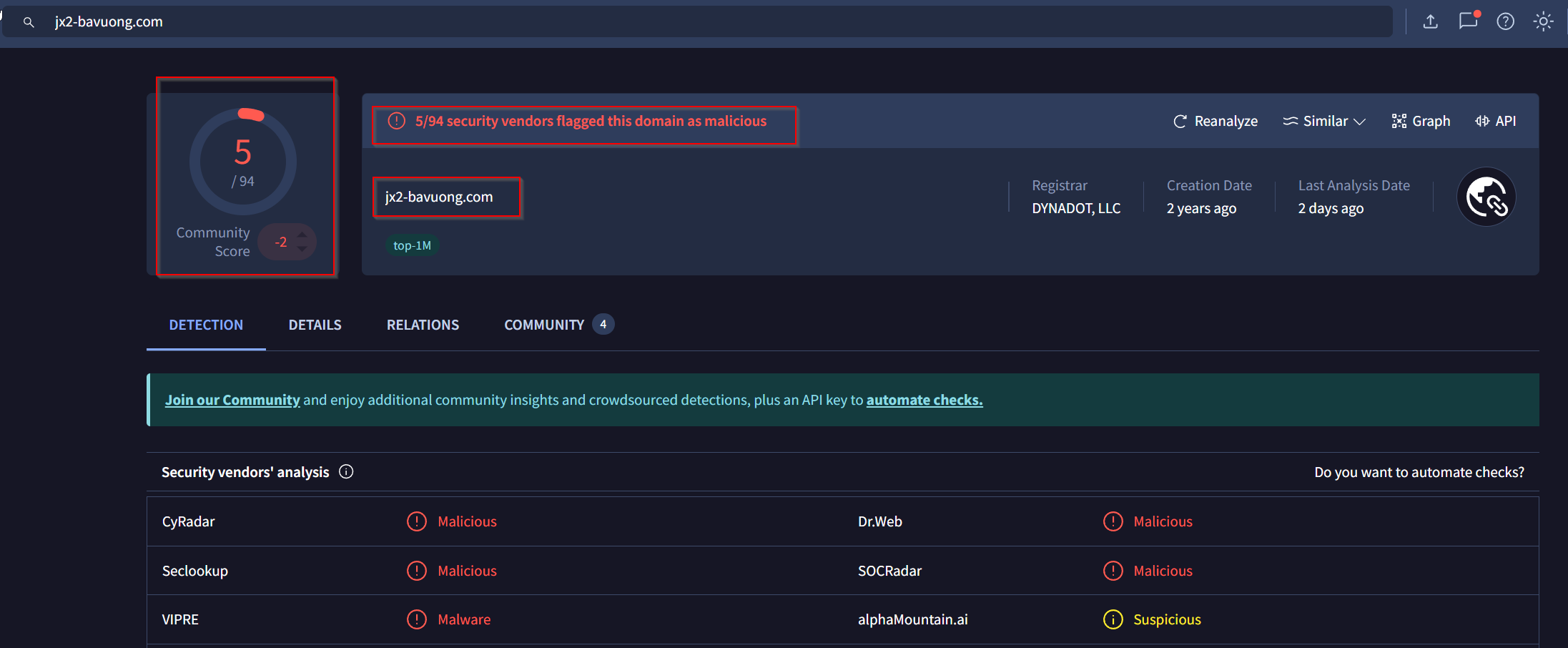
Okay we found the suspicious URL. Lets defang it with Cyberchef.
Answer: jx2-bavuong[.]com
Task 2: What is the total number of HTTP requests sent to the malicious domain?
We change our command a bit and sort + filter all the duplicates out.
1
2
3
4
5
ubuntu@ip-10-10-165-123:~/Desktop/exercise-files$ tshark -r directory-curiosity.pcap -Y "http.request" -T fields -e http.host |sort -r |uniq -c
      1 www.bing.com
      3 ocsp.digicert.com
     14 jx2-bavuong.com
      8 239.255.255.250:1900
Answer: 14
Task 3: What is the IP address associated with the malicious domain?
For this task we add the field ip.dst into our last command:
1
2
3
4
5
6
7
8

ubuntu@ip-10-10-165-123:~/Desktop/exercise-files$ tshark -r directory-curiosity.pcap -Y "http.request" -T fields -e http.host -e ip.dst |sort -r |uniq -c
      1 www.bing.com	204.79.197.200
      3 ocsp.digicert.com	93.184.220.29
     14 jx2-bavuong.com	141.164.41.174
      8 239.255.255.250:1900	239.255.255.250
Now we defang the IP address via Cyberchef into 41[.]164[.]41[.]174
Answer: 41[.]164[.]41[.]174
Task 4: What is the server info of the suspicious domain?
Lets bake another command here. We use http.server as a field and changing our Displayfilter with -Y into ip.addr == 41.164.41.174.
1
2
3
4
5
6
7

ubuntu@ip-10-10-165-123:~/Desktop/exercise-files$ tshark -r directory-curiosity.pcap -Y "ip.addr == 141.164.41.174" -T fields -e http.host -e ip.dst -e http.server|sort -r |uniq -c
     14 jx2-bavuong.com	141.164.41.174
     14 	192.168.100.116	Apache/2.2.11 (Win32) DAV/2 mod_ssl/2.2.11 OpenSSL/0.9.8i PHP/5.2.9
    115 	192.168.100.116
    103 	141.164.41.174
Answer: Apache/2.2.11 (Win32) DAV/2 mod_ssl/2.2.11 OpenSSL/0.9.8i PHP/5
Task 5: What is the number of listed files?
1
2
Follow the "first TCP stream" in "ASCII".
Investigate the output carefully.
We can check the TCP stream with following command:
tshark -r directory-curiosity.pcap -z follow,tcp,ascii,0 -q
After analyzing the tcp-stream I found the files in that html:
1
2
3
4
5
6
7
8
9
10
11
12
13
14
15

<!DOCTYPE HTML PUBLIC "-//W3C//DTD HTML 3.2 Final//EN">
<html>
 <head>
  <title>Index of /</title>
 </head>
 <body>
<h1>Index of /</h1>
<pre><img src="/icons/blank.gif" alt="Icon "> <a href="?C=N;O=D">Name</a>                    <a href="?C=M;O=A">Last modified</a>      <a href="?C=S;O=A">Size</a>  <a href="?C=D;O=A">Description</a><hr><img src="/icons/text.gif" alt="[TXT]"> <a href="123.php">123.php</a>                 12-Jul-2020 08:43    1
<img src="/icons/binary.gif" alt="[   ]"> <a href="vlauto.exe">vlauto.exe</a>              06-May-2020 23:32   40K
<img src="/icons/text.gif" alt="[TXT]"> <a href="vlauto.php">vlauto.php</a>              10-Jul-2020 23:25   93
<hr></pre>
<address>Apache/2.2.11 (Win32) DAV/2 mod_ssl/2.2.11 OpenSSL/0.9.8i PHP/5.2.9 Server at jx2-bavuong.com Port 80</address>
</body></html>
We have:
123.phpvlauto.exevlauto.php
Answer: 3
Task 6: What is the filename of the first file?
We found out: 123.php
Lets defang it.
Answer: 123[.]php
Task 7: What is the name of the downloaded executable file?
We found out: vlauto.exe
Lets defang it.
Answer: vlauto[.]exe
Task 8: What is the SHA256 value of the malicious file?
Now we have to export all the traffic to get the files.
We can do that with following command:
tshark -r directory-curiosity.pcap --export-objects http,/home/ubuntu/Desktop/exercise-files/extract -q
1
2
3
4
5
6
7
8
9
10
11
12
13

ubuntu@ip-10-10-165-123:~/Desktop/exercise-files$ tshark -r directory-curiosity.pcap --export-objects http,/home/ubuntu/Desktop/exercise-files/extract -q
ubuntu@ip-10-10-165-123:~/Desktop/exercise-files$ ls
directory-curiosity.pcap  extract
ubuntu@ip-10-10-165-123:~/Desktop/exercise-files$ cd extract/
ubuntu@ip-10-10-165-123:~/Desktop/exercise-files/extract$ ls
 %2f                                                                                                                          blank.gif         target.ip
 MFEwTzBNMEswSTAJBgUrDgMCGgUABBSAUQYBMq2awn1Rh6Doh%2FsBYgFV7gQUA95QNVbRTLtm8KPiGxvDl7I90VUCEAJ0LqoXyo4hxxe7H%2Fz9DKA%3D       blog              target.method
'MFEwTzBNMEswSTAJBgUrDgMCGgUABBSAUQYBMq2awn1Rh6Doh%2FsBYgFV7gQUA95QNVbRTLtm8KPiGxvDl7I90VUCEAJ0LqoXyo4hxxe7H%2Fz9DKA%3D(1)'   botlogger.php     target.port
'MFEwTzBNMEswSTAJBgUrDgMCGgUABBSAUQYBMq2awn1Rh6Doh%2FsBYgFV7gQUA95QNVbRTLtm8KPiGxvDl7I90VUCEAJ0LqoXyo4hxxe7H%2Fz9DKA%3D(2)'  'favicon(1).ico'   text.gif
'MFEwTzBNMEswSTAJBgUrDgMCGgUABBSAUQYBMq2awn1Rh6Doh%2FsBYgFV7gQUA95QNVbRTLtm8KPiGxvDl7I90VUCEAJ0LqoXyo4hxxe7H%2Fz9DKA%3D(3)'   favicon.ico      'vlauto(1).exe'
'MFEwTzBNMEswSTAJBgUrDgMCGgUABBSAUQYBMq2awn1Rh6Doh%2FsBYgFV7gQUA95QNVbRTLtm8KPiGxvDl7I90VUCEAJ0LqoXyo4hxxe7H%2Fz9DKA%3D(4)'   proxy             vlauto.exe
We have our files. Now we can use sha256sum to get the hash:
1
2
3

ubuntu@ip-10-10-165-123:~/Desktop/exercise-files/extract$ sha256sum vlauto.exe
b4851333efaf399889456f78eac0fd532e9d8791b23a86a19402c1164aed20de  vlauto.exe
Answer: b4851333efaf399889456f78eac0fd532e9d8791b23a86a19402c1164aed20de
Task 9: What is the “PEiD packer” value?
Lets check Virustotal here:
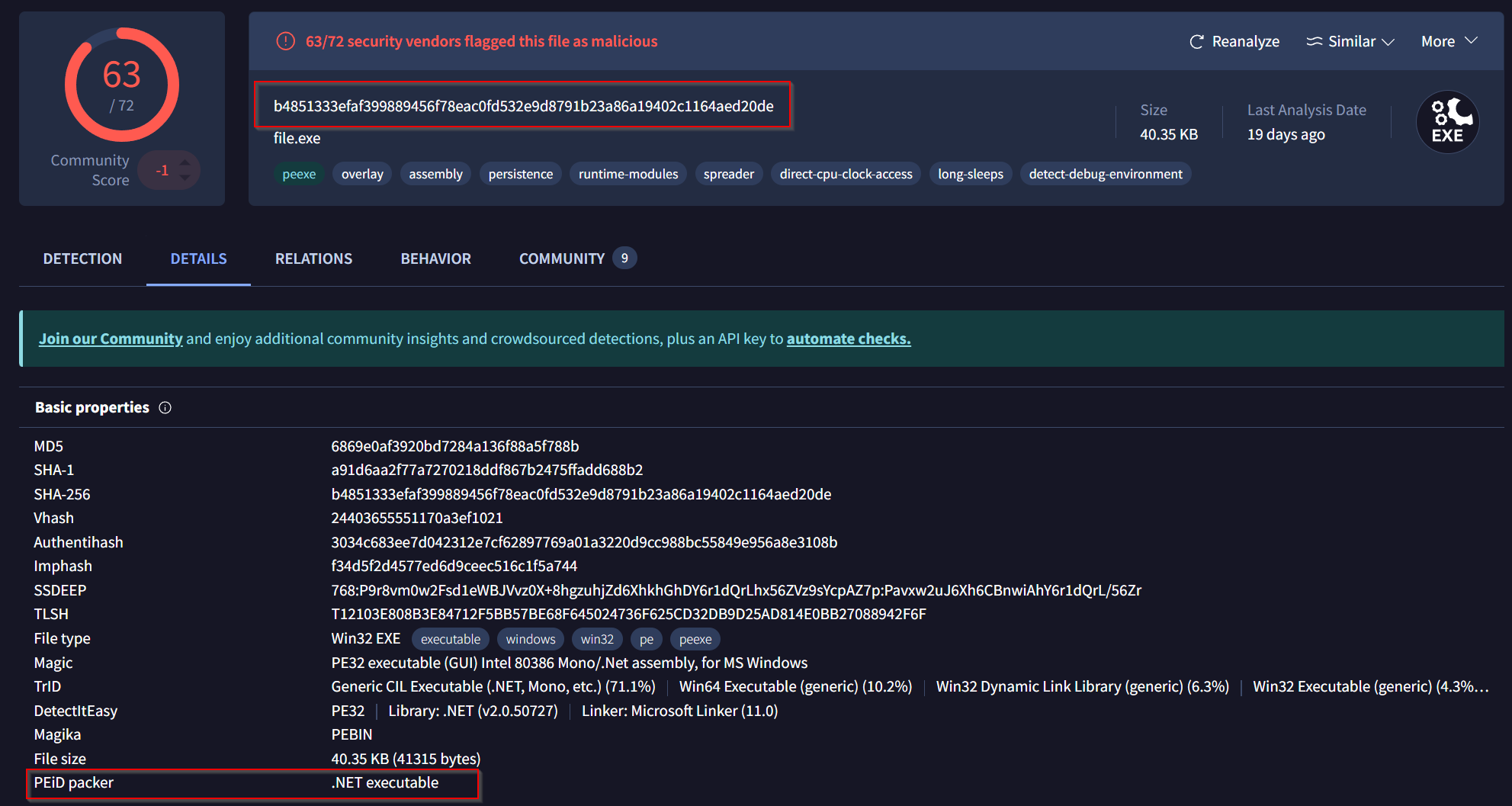
Answer: .NET executable
Task 10: What does the “Lastline Sandbox” flag this as?
Another look into Virustotal!
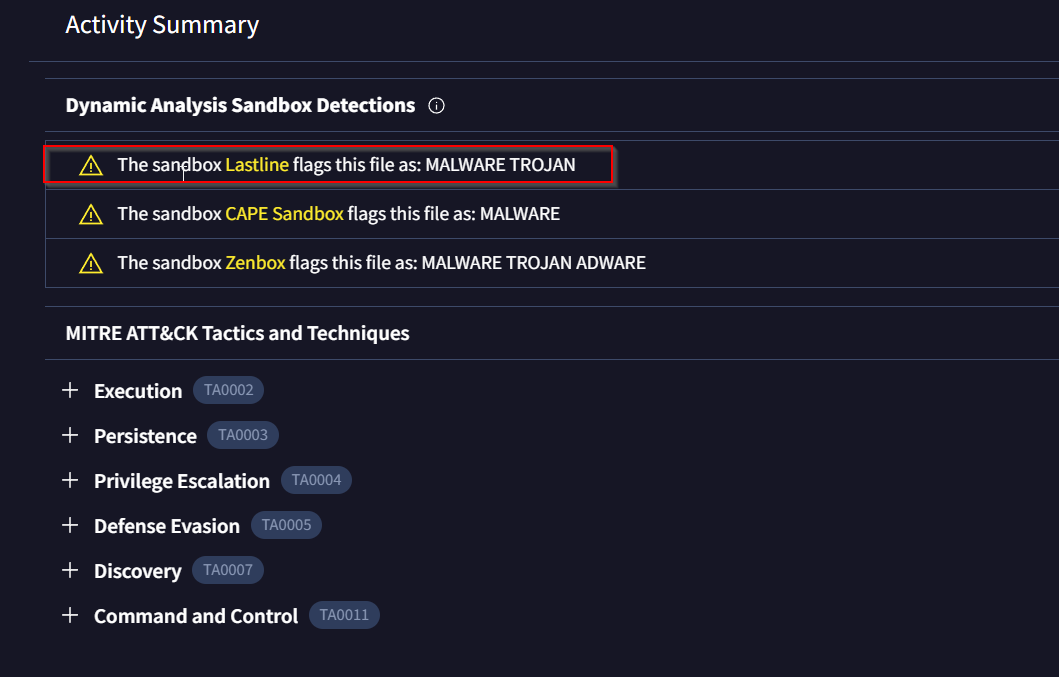
Answer: MALWARE TROJAN
Thoughts:
Very useful and cool rooms to actually use Tshark here. It could be a bit more challenging.
What did we learn?
- using
tsharkfor analyzing traffic in detail - using
Virustotalfor analyzing suspicious URLs - understanding how
suspicioustraffic looks like - understanding how a SOC Analyst could work on such
pcaps